
Nano Banana Video: turn any photo or prompt into a short AI videoCreate a Video

Reference images (optional)

For the best result
  • Optional: add 1 to 4 reference images (JPG, PNG, WebP or HEIC, up to 10 MB each) to edit or combine them; leave empty to create from text
  • Describe the subject, the setting, the style and the light, e.g. "a ceramic mug on a wooden table, morning window light, product photo"
  • Put any words the image should show in quotes, e.g. a sign that reads "Open Daily"
  • With reference images, say what to keep as well as what to change
0/3000

Inspirations

Model
Aspect ratio

Free to try, no sign-up

Nano Banana Image Generator

Describe an image or add reference photos, choose Nano Banana 2 or Nano Banana Pro, and download the result. Try it with three free images, no sign-up.
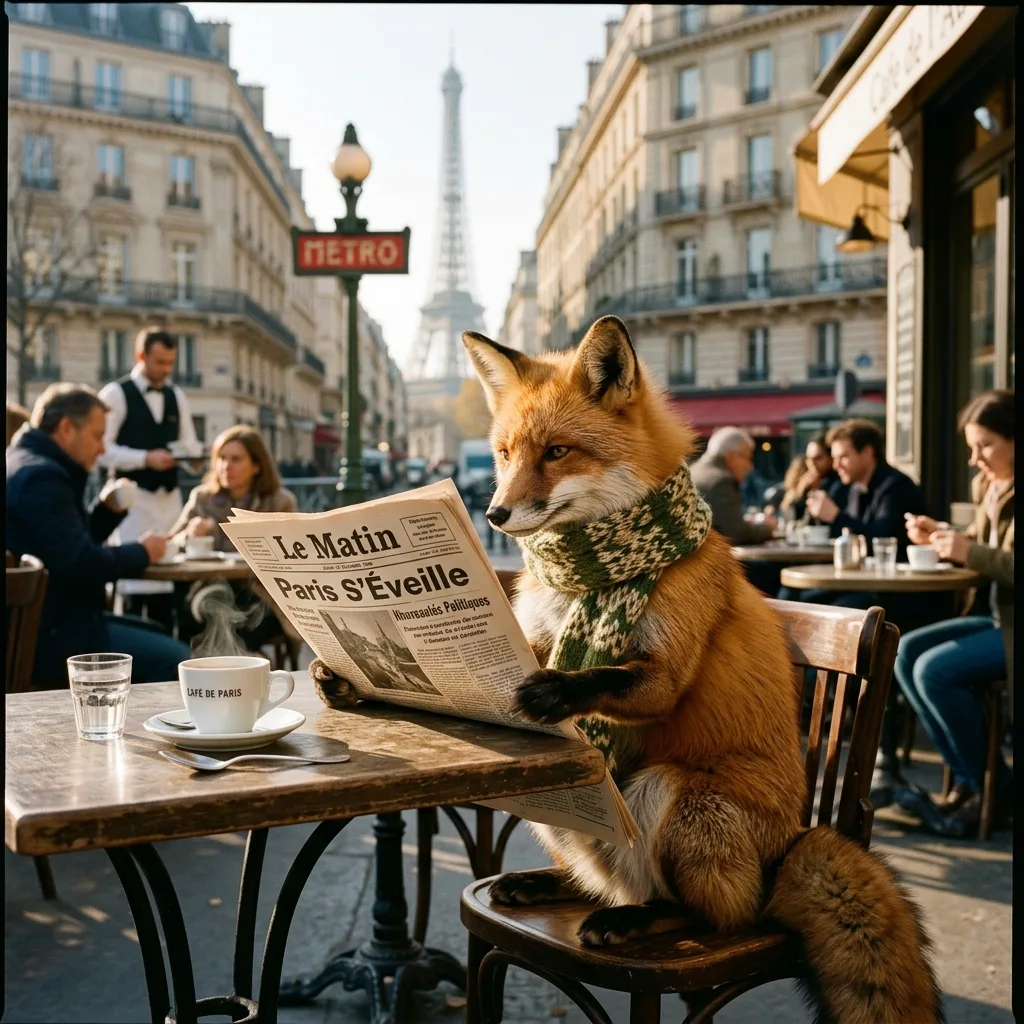
Nano Banana Image Generator result: Nano Banana image generator: a red fox in a knitted scarf reading a newspaper titled "Le Matin" at a Paris cafe

Example result. Describe your image to make yours.

Examples

Nano Banana Image Generator result: Nano Banana image generator: a red fox in a knitted scarf reading a newspaper titled "Le Matin" at a Paris cafe
Nano Banana Image Generator result

What the Nano Banana AI image generator does

This Nano Banana image generator makes one image per run from a text prompt. Add one to four reference images and they become the base: the model is asked to keep their people, faces, products, text and composition, and to change or combine only what you describe.

Pick Nano Banana 2 or Nano Banana Pro, an aspect ratio and a resolution. Put words you want in the picture in quotes. In our test, a fox reading a newspaper titled "Le Matin" came back with the title spelled as asked.

Every visitor can make three free images with no sign-up. As with any AI output, check the result before you use it.

The panel has two modes in one box. With no image, it works as a text-to-image tool. With images, it becomes an editor and blender. Six inspirations fill the prompt in one click if you want a starting point, and you can edit the text before you generate.

Made for

  • Text to image
  • Product mockups
  • Posters and signs
  • Photo edits
  • Blending photos

Nano Banana 2 vs Nano Banana Pro

Both models sit behind one switch in the panel. Here is what changes when you flip it.

Nano Banana 2Nano Banana Pro
Where you pick itModel switch, the defaultModel switch above Generate
Credits at 1K, for example812
Credits at 2K, for example1212
Credits at 4K, for example1821
Free images without sign-up1K, uses one1K, uses one
Reference images0 to 40 to 4
Aspect ratios8 ratios, 1:1 to 21:9Same 8 ratios

How to use the Nano Banana image generator

  1. 1

    Write a prompt

    Describe the subject, the setting, the style and the light, up to 3,000 characters. Click an inspiration to start from a ready prompt. Short, concrete prompts with a clear subject work best.

  2. 2

    Add reference images if you want

    Leave the upload empty to create from text, or add up to four JPG, PNG, WebP or HEIC files of up to 10 MB each. Say what to keep and what to change.

  3. 3

    Pick the model and size, then generate

    Choose Nano Banana 2 or Pro, a ratio and a resolution, then press Generate Image. Guests get 1K; signed-in users can pick 2K or 4K. A run can take a few minutes. When the image appears in the result area, press Download.

Frequently asked questions

Partly. Every visitor gets three free images for life, at 1K, with no sign-up and no email. After those, images need an account and credits. The allowance is shared by all image tools on this site, not given per page, and it never resets. Guests can switch to Nano Banana Pro, but the image is still 1K and uses one of them.

Open the Nano Banana image generator, write a prompt and press Generate Image. You need no account for the first three free images. Free images are 1K only; 2K and 4K need an account and credits.

Type what you want to see in the Nano Banana image generator, press Generate Image and download the result. For an edit instead, add one to four reference images and describe what to change. Put any words the image should show in quotes.

Signed-in users pay credits per image. For example, Pro costs 12 credits at 1K or 2K and 21 at 4K, and Nano Banana 2 costs 8, 12 and 18. Prices may change; the panel shows the credits before you generate. Credits are not on sale yet.

Both are Google image models and both take the same prompt, references, ratios and resolutions here. On this site the visible difference is the credit price per image. Try both on the same prompt and compare the results.

Yes. Add one to four reference images and they become the base. The model is asked to keep their people, faces, products, text and composition and change only what you describe. It usually does, but compare with the original.

Pick 1:1, 3:4, 4:3, 9:16, 16:9, 2:3, 3:2 or 21:9, and 1K, 2K or 4K. Guests get 1K only. Each run makes one image, so there is no batch. The last result stays on the page until a new run replaces it, so download the image you want to keep.

Put the words in quotes in your prompt and the model is asked to render them as written. In our test, the title "Le Matin" on a newspaper came out spelled as asked. Check spelling in every result.

Your photo is only used to create your videos and images and is never used to train AI models. Uploaded images and results are stored, and we delete them on request. The images and prompts go to Google models, which may keep them for a limited time.

A failed run says it didn't work out and wasn't counted: it uses none of your free images and no credits. Try the prompt again with a simpler description.